SMTP + IMAP · Email management

Email management system — smart intake, AI replies, and professional campaigns

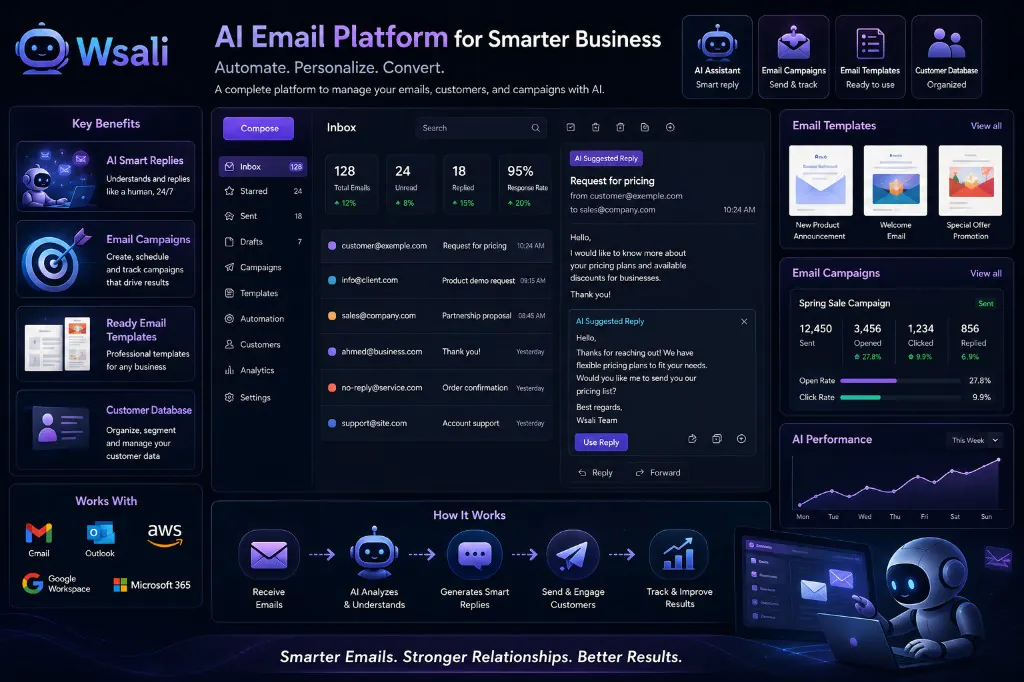
Integrated platform for email management: connect accounts via IMAP and SMTP, receive messages in a unified inbox, let AI reply in the same style as WhatsApp, and launch email campaigns to your customer base — all from one dashboard.

AI email bot for email management system — Wsali
  • 7Channels in one inbox
  • IMAP sync
  • 24/7Smart bot replies
  • 84%Campaign open rate
  • Ready templates

Why Wsali for email management?

We target the keywords business owners search for — and deliver real solutions

Email management

Not ordinary email software — an integrated platform that combines receiving, sending, classification, and replies in one dashboard. Connect Gmail, Outlook, or any SMTP/IMAP server and start managing all customer messages from a unified inbox.
Email management system

Cloud SaaS built for customer service and sales teams: internal tickets, agent assignment, AI, ready templates, and performance reports — multiple sites and brands in one account.

Email campaigns

Launch professional email campaigns for segments from your database. Track opens, clicks, and engagement. Target VIP customers, new subscribers, or inactive customers — and link the campaign to ready-made templates.

Email templates

Ready template library: welcome, order confirmation, price quote, follow-up, and reminder. Customize with your brand or let AI generate content — then send manually or in an automated campaign.

AI for email

Understands message context, classifies it, suggests a reply, and extracts customer data — same logic as the WhatsApp bot. 24/7 auto-reply with handoff to your agent at any time.

SMTP · IMAP integration

Works with Gmail, Google Workspace, Outlook, Office 365, Zoho, AWS SES, and any standard mail server. No need to migrate email — just connect and start.

Full platform tour — 6 steps documented with screenshots

Every screenshot from the actual dashboard — from connecting IMAP/SMTP to AI replies and launching email campaigns.

Email connection — IMAP for receiving and SMTP for sending

Email management system integrates with any provider

  • Email management
  • IMAP · SMTP

Connect your real email without changing providers: IMAP pulls incoming messages every 5 minutes, and SMTP sends replies from the same address — with support for multiple sites and brands in one account.

1

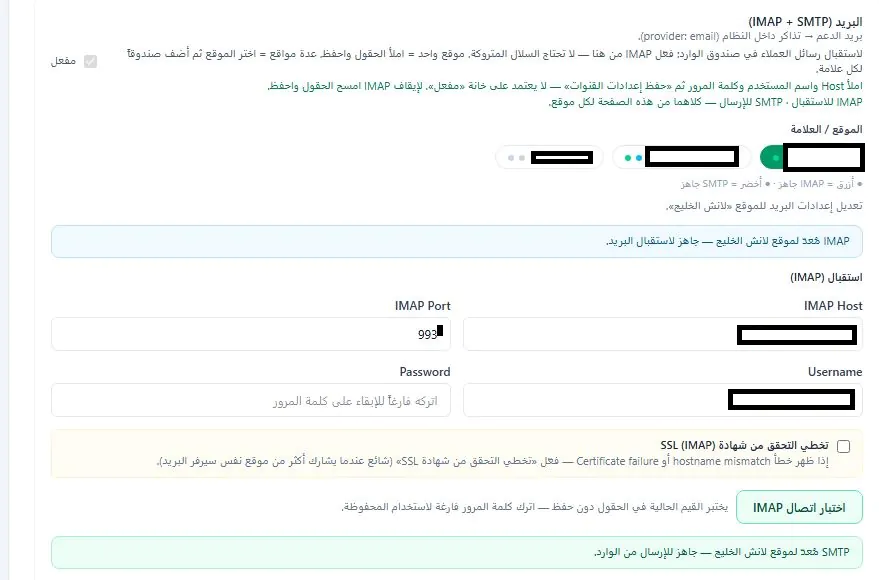
Receiving setup — IMAP per site and brand

Enter Host, Port, username, and password — the system tests the connection instantly. Supports SSL and optional certificate verification skip. Each site or brand gets its own email account with readiness indicators: blue = IMAP ready, green = SMTP ready.

  • Multiple accounts for different sites and brands
  • Test IMAP connection without saving
  • Import unread messages from INBOX only
  • Automatic scheduling every 5 minutes via Cron
Set up IMAP and SMTP for email management — Wsali
2

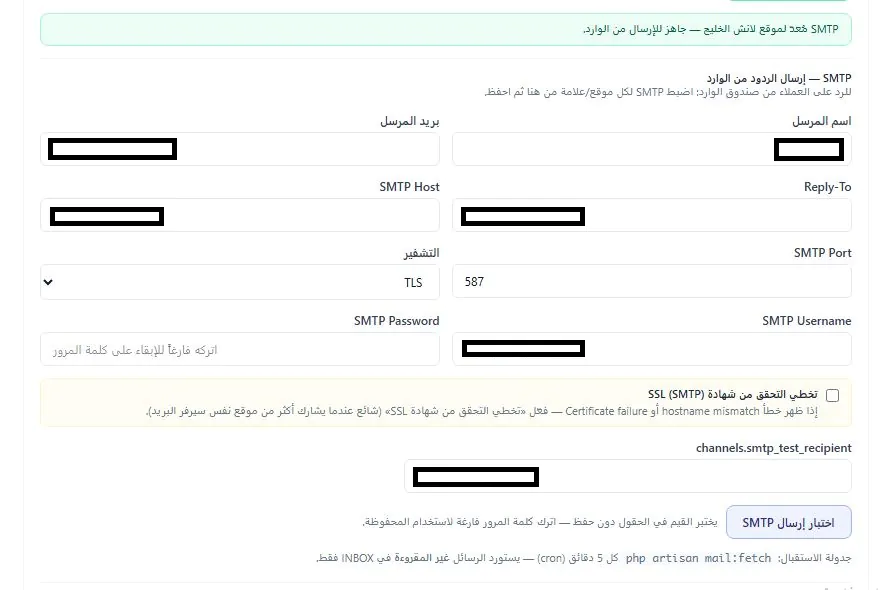
Sending setup — SMTP to reply from inbox

Set sender name, sender email, Reply-To, Host, Port, and encryption (TLS/SSL). Test sending to any address before saving — replies come from your official email, not a generic address, preserving customer trust and domain reputation.

  • Professional signature and custom sender name
  • Instant SMTP send test
  • Gmail · Outlook · Zoho · AWS support
  • Skip SSL verification when certificates conflict
Set up SMTP to send replies from the inbox — email management system

Unified inbox — all email messages in one place

Same WhatsApp experience — but for email

  • Unified inbox
  • Support tickets

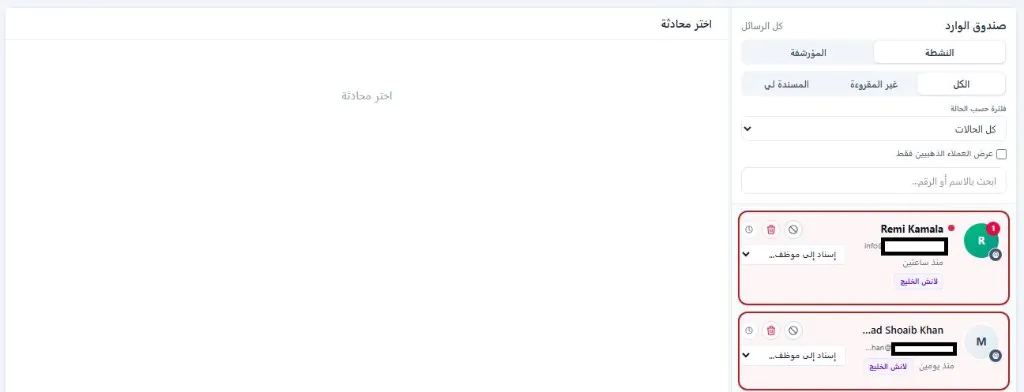
Professional inbox that collects messages from all your sites. Filter by status, unread, assigned to you, and VIP customers — with agent assignment, archive, snooze, and block from the same screen.

3

Conversation list — active, archived, and filtered

Every email becomes a ticket in the system (provider: email). Search by name or address, filter by status, and show VIP customers only. Each card shows tag, time, and brand — with quick assign, snooze, and block buttons.

  • Tabs: All · Unread · Assigned to me
  • Filter by conversation status
  • Assign to agent directly from the card
  • Brand tags per site
Unified email inbox — email management

AI replies to email — same logic as WhatsApp

Summarize · suggest reply · classify · extract data

  • Artificial intelligence
  • Automated replies

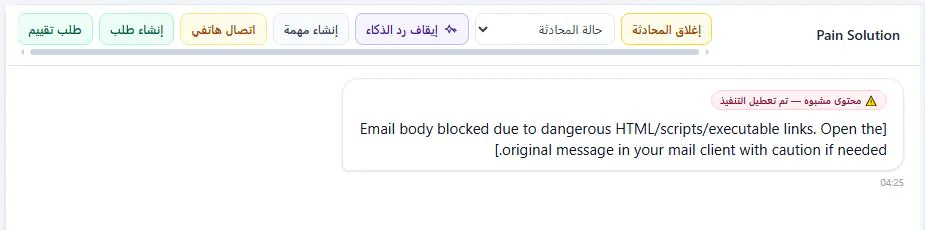
The smart bot understands message content, classifies it, suggests a ready reply, and extracts customer data automatically. You can disable AI reply for any conversation, create a task, request, or call — all from the top action bar.

4

Email conversation — AI and malicious content protection

When email arrives with HTML or suspicious scripts, execution is disabled automatically and a security warning appears. The "Disable AI reply" button gives you full control. AI suggests a professional reply based on message context and your company data.

  • Block HTML and dangerous executable links
  • Enable/disable AI reply per conversation
  • Create task · request · call from conversation
  • Change conversation status and close ticket
AI replies to email with security protection — Wsali
5

Inbox and bot features — channel-specific control

Enable for email: keyword bot auto-replies, competitor mention alerts, and quick replies in the compose box. Same settings you know from WhatsApp — applied to the email channel.

  • Smart bot auto-replies on email channel
  • Competitor mention alerts
  • Ready quick replies in the editor
  • Requires smart bot enabled for the company
Inbox and bot features for email channel

Email security — block addresses and spam

Full control over what enters the inbox

  • Email protection
  • Blocklist

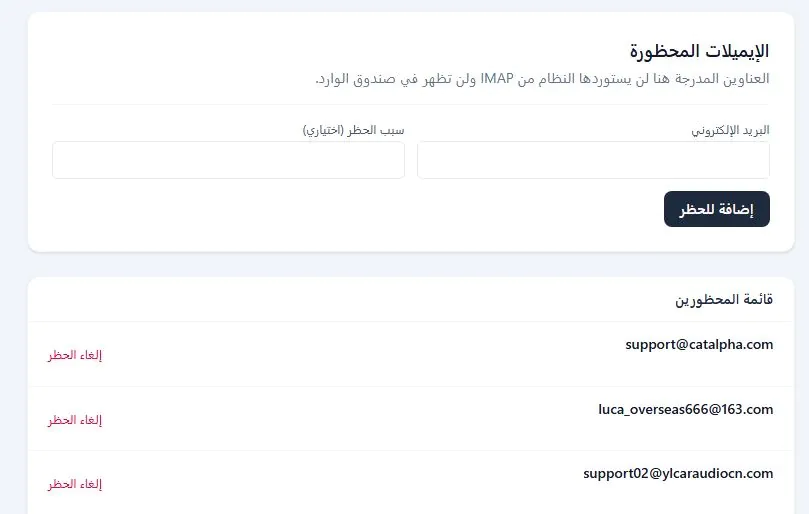
Add email addresses to the blocklist — the system will not import them from IMAP and they will not appear in the inbox. Multi-layer protection: spam filtering, dangerous HTML blocking, and a manageable blocklist.

6

Blocked emails — control import

Enter the email and block reason (optional) — the system ignores any message from that address. Unblock with one click. Ideal for stopping spam from suppliers or repeated phishing attempts.

  • Instant block without deleting from server
  • Block reason for decision documentation
  • Unblock with one click
  • Never appears in inbox
Blocked email list in email management system

Email templates — ready for instant send

Professional template library customized to your brand or generated by AI

New customer welcome

Automatic welcome on first contact — with your company name and brand identity

Order confirmation

Ready template with order details, amount, and expected delivery date

Price quote

Send professional price quotes with detailed tables and payment terms

Post-purchase follow-up

Thank-you and satisfaction follow-up after order or service completion

Reply to inquiry

Flexible template for FAQ replies — customized by AI

Appointment reminder

Automatic reminder before appointment with confirmation or reschedule link

Create a new template

Design your own template or ask AI to write the content

📣 Email campaigns

Launch professional email campaigns — track every click and open

Target segments from your database: VIP customers, new subscribers, or inactive customers. Choose a ready template, define the audience, and launch the campaign — the system tracks send, open, and click in one dashboard.

  • Target segments from CRM
  • Link to ready templates
  • Real-time open and click tracking
  • Schedule sending
  • Campaign performance reports
  • Background sending
12+ Active campaign
3.4K Sent message
84% Open rate
36% Click rate
Summer offers campaign 78%

Smart email management cycle

From intake to analytics — integrated 6-step path

  1. Receive email IMAP every 5 minutes
  2. AI analytics Classification and extraction
  3. Classify and organize Tickets and assignment
  4. Automatic or manual reply Templates + AI
  5. Data capture Unified CRM
  6. Follow-up and analysis Reports and campaigns

FAQ about email management system

Quick answers before you start

Do I need to change email provider?

No. Connect your current email via IMAP and SMTP — Gmail, Outlook, or any mail server. Your messages stay on your server and the system syncs them.

How does AI work with email?

Analyzes message content, classifies it, suggests a reply, and can auto-reply by keyword — just like WhatsApp. You can disable reply for any conversation.

What is the difference between templates and campaigns?

Templates are ready messages for individual or automated replies. Campaigns are bulk sends to segments from your database with open and click tracking.

Does it support multiple sites and brands?

Yes. Each site or brand has independent IMAP/SMTP settings with separate readiness indicators.

How does the system protect against malicious email?

HTML and dangerous link filtering, blocked address list, and suspicious content execution disabled with a clear warning for agents.

Ready to turn your email into a sales and customer service channel?

Get a free demo — email management system with AI, templates, and campaigns